Integrations
How ADP Integration Handles Identity, Enrollment State, and Lifecycle
Building an ADP integration that clears security review and passes validation is one challenge. Building one that continues to work correctly once real employees are enrolling across real employer groups is a different one.
The behaviors that determine whether a voluntary benefits integration holds up in production are not in the connectivity layer. They are in how ADP identifies employees before a single screen loads, how enrollment state changes once a product is elected, and how expiration logic operates across the full lifecycle of a coverage event. They become visible once enrollment is in motion.
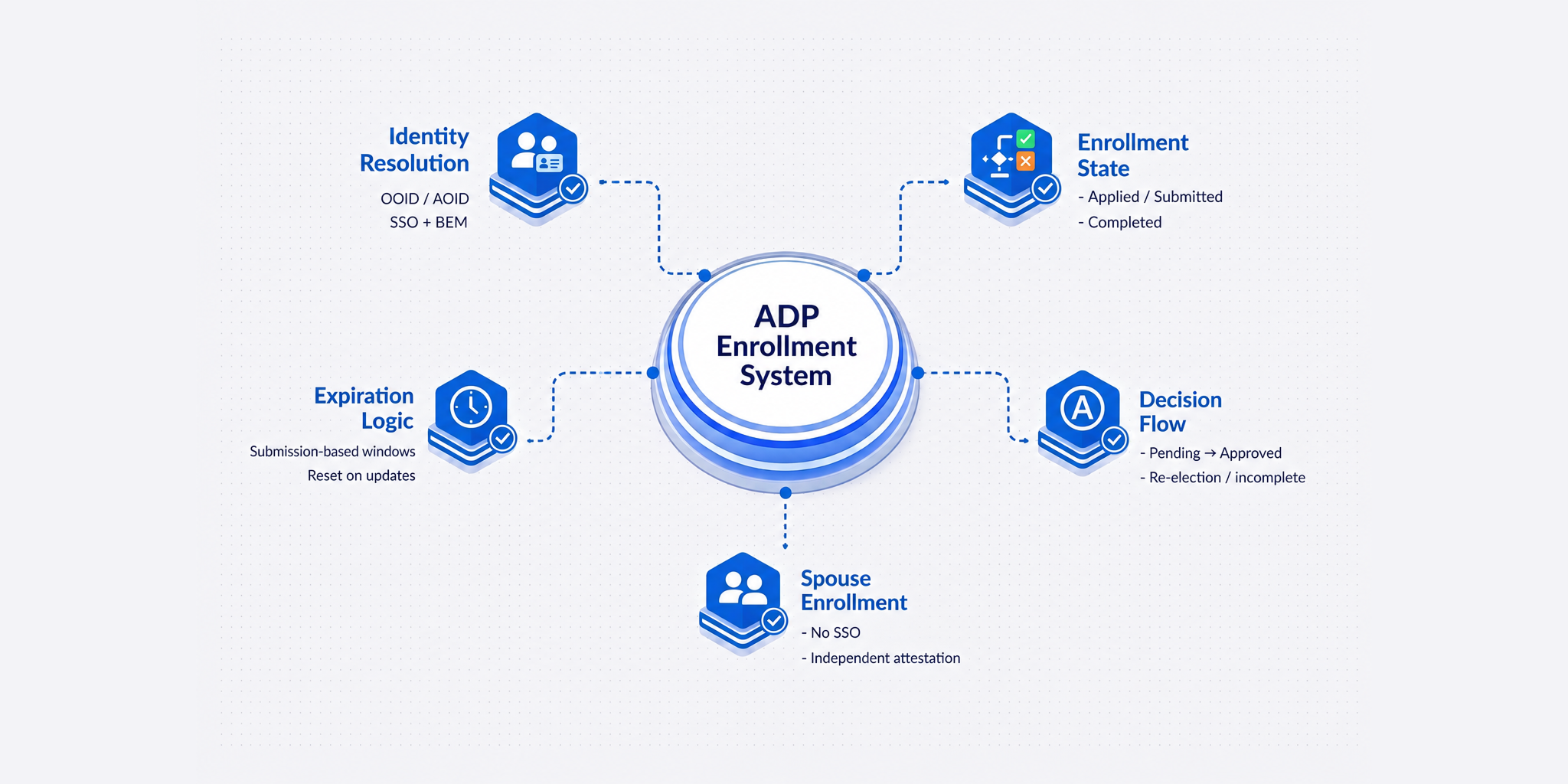
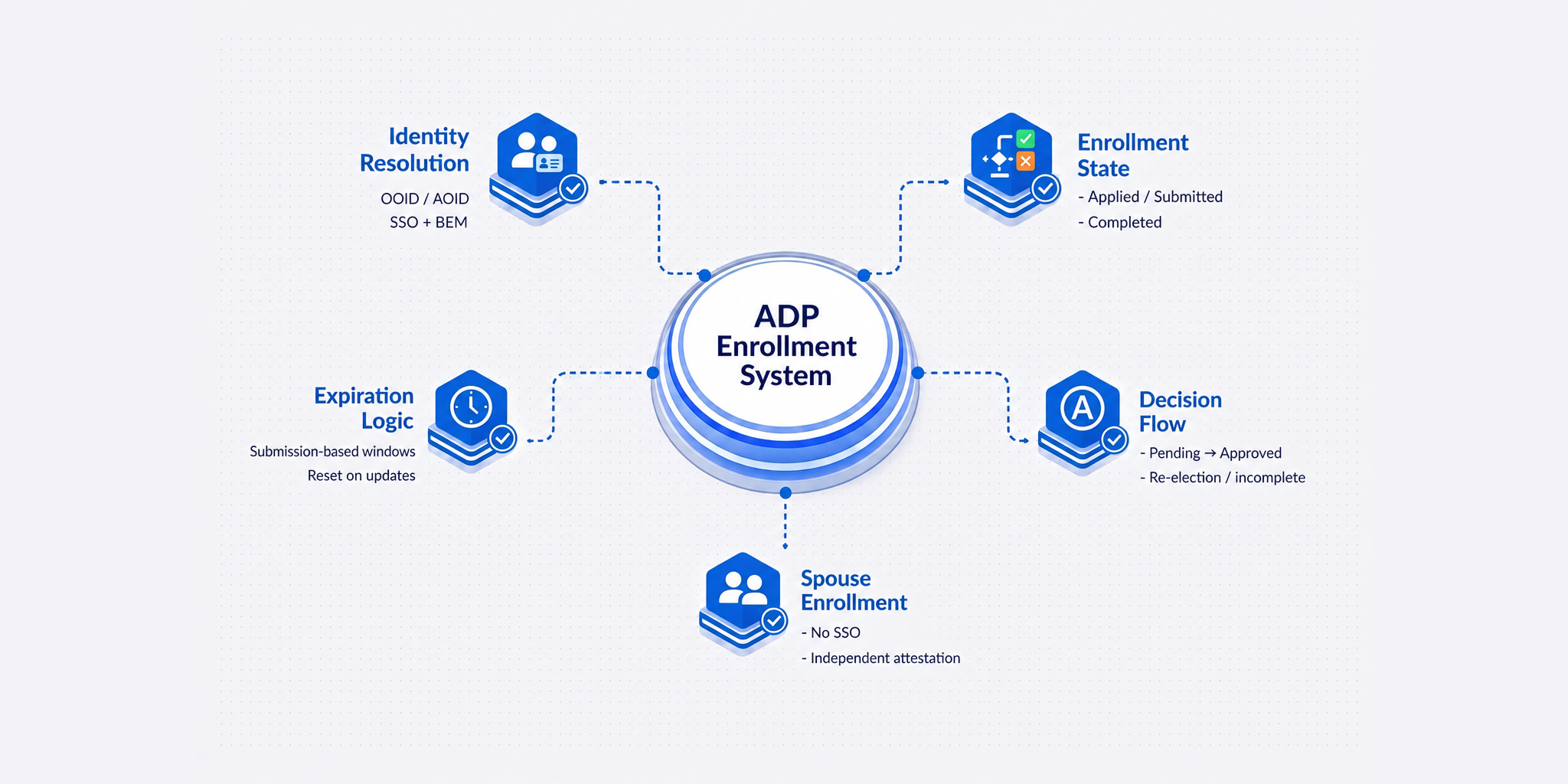
This article covers four of those behaviors in depth: how identity resolution works inside a live enrollment, how enrollment state is tracked across the full journey, how the expiration and decision loop closes correctly, and how spouse enrollment is enforced as a compliance workflow.
How Identity Resolution Works Inside a Live Enrollment
ADP's SSO is built on OIDC, the OpenID Connect standard used broadly for federated identity. The implementation detail most integrations miss is sequencing: the BEM event fires before the SSO handshake, and the SSO payload does not carry standard identity attributes like names, email, date of birth.
When an employee selects a product in ADP Workforce Now, ADP transmits a Benefits Enrollment Management payload to the integrated platform carrying eligibility, coverage, and demographic data. The SSO flow follows, authenticating the employee and routing them into an enrollment that is already in context, not a blank form.
ADP passes two proprietary identifiers in the SSO token:
- OOID (Organization Object Identifier): identifies the employer group
- AOID (Associate Object Identifier): identifies the individual employee
An integration that does not build a dedicated resolution layer for these identifiers can authenticate the employee and still have no idea which employer group, policy, or enrollment event that employee belongs to. The routing fails.
The mechanism that links the SSO handshake to the correct EOI payload is a claim key, a unique identifier generated by the carrier when the EOI payload is sent to ADP. When the employee arrives via SSO, the claim key matches the incoming session to the right enrollment context.
One additional failure point that surfaces after launch: most SSO implementations are validated once at setup and never monitored again. Issues are discovered when an employee encounters them mid-enrollment. A production-ready integration needs a mechanism to verify that the SSO connection is functioning before employees begin, a confirmable health check that implementation and HRIS teams can run on demand.
How Enrollment State Is Tracked Across the Full Journey
Electing a product is the start of an enrollment, not the completion of it. What the employee encounters when they return depends on where they are in the journey and whether the integration was built to handle each scenario without breaking continuity.
A generic landing experience has no awareness of enrollment context. It cannot distinguish between an employee with an application in progress, one who has already submitted, and one who needs to start fresh for a new product election. Everyone lands in the same state, leading to restarted flows, missed actions, and duplicate applications.
A correctly built integration tracks three distinct states and responds to each specifically:
- Applied: The employee has a started but unsubmitted application. They are resumed into that existing application with data intact. Applications resume, not restart.
- Submitted: The employee has submitted an application. New product elections open a new application, pre-filled from available BEM data, separate from the submitted record.
- Completed: The employee has a completed application on record. New product elections follow the same logic, opening a new pre-filled application without touching the completed record.
This state awareness drives routing, surfaces pending actions, and preserves application continuity. Where an email address is available in the BEM file, direct links to both employee and spouse applications are sent to maintain continuity even when a session ends before completion.
One behavior that intersects directly with the ADP interface: before an initial status is returned from the carrier, ADP surfaces a "Provide for EOI" button that the employee can access repeatedly. Once a pending or final decision status is returned, that button disappears and the employee can no longer initiate the questionnaire from that tile. If the integration fails to return an initial status promptly, the employee-facing experience in ADP remains in an indeterminate state longer than intended.
When an employee elects multiple products in the same session, or adds a product while another application is pending, all relevant coverages travel on the same BEM transmission. One product can be pending while another is approved, and the integration has to track those states separately. If errors are found in the enrollment payload, ADP's model includes a structured correction loop: the carrier sends error details back via the enrollment response API, and once corrected, the payload is resent. This is a designed part of the exchange model, not a workaround.
How the Expiration and Decision Loop Closes Correctly
Enrollment expiration is one of the most consequential behaviors in ADP's model and one of the least likely to be replicated correctly. When incorrect, the failure compounds over time as applications expire on the wrong dates, employees lose enrollment time they are entitled to, and benefit elections fall out of sync between ADP and the carrier's system of record.
The expiration window is visible to the employee inside ADP Workforce Now, showing how many days remain to complete the EOI questionnaire. If the window is miscalculated, employees see an incorrect deadline. This is not only a backend issue, but directly visible to employees.
Three mechanics are worth understanding precisely:
- The application window starts from when the employee submits their election, not from when the enrollment event was created by the employer. An employee who submits a life plan early in open enrollment and adds an STD plan two weeks later has two separate windows, each starting from the date of that specific submission.
- The window length is carrier-configurable as part of the integration setup, not a fixed ADP default.
- If a product is added or updated on an active enrollment event, the expiration for that coverage resets from the date of the update. An employee whose coverage is modified mid-cycle receives a full window from the point of the change, not a reduced window based on elapsed time.
Most integrations set a static expiration at the original event and miss updates. Correctly handling expiration requires real-time tracking of enrollment event changes, not a one-time calculation at setup.
The decision loop introduces two additional behaviors the integration has to handle:
Re-election after decline. ADP does not block an employee or dependent from re-electing after a decline. A re-election creates a new BEM transmission, not a modification of the existing record. It must be treated as a distinct enrollment event with its own application and underwriting workflow.
Incomplete decisions. A carrier may close an application as incomplete when required medical information was not received, and later reopen it once that information arrives. The EOIS return loop is not always a single transaction. The integration must support a subsequent final status arriving after an initial incomplete, updating the employee's ADP record without manual intervention.
On the EOIS return path specifically: ADP supports two models. The carrier can push EOIS decision payloads back to ADP via Marketplace as decisions are made. Alternatively, ADP's EOI Gateway can poll the carrier's API periodically for decision status updates. Both paths need to be accounted for in how the integration handles the return flow.
How Spouse Enrollment Is Enforced as a Compliance Workflow
ADP provides SSO for employees. It does not provide SSO for spouses. This creates a specific technical gap when a spouse-only product exists on an enrollment event without a corresponding employee application.
The employee arrives through SSO with no visible application or next step, leaving both the employee and HR without clarity on why enrollment has stalled. Detecting and handling this correctly requires a dedicated workflow triggered at the SSO handshake. When a spouse-only condition is identified, the integration:
- Routes the employee to a page that explains the enrollment context and what is required
- Provides a direct pathway to initiate the spouse application
- Delivers a pre-filled spouse application to the spouse via email, populated from the BEM data already received
- Requires the spouse to complete their own medical questions independently
The spouse application link is generated as part of the same BEM transmission that carries the employee's coverage data. When both employee and spouse coverages are on the same transmission and the employee has not yet completed their questionnaire, the spouse link is generated in parallel so both flows can proceed without one blocking the other.
The independent attestation requirement is not a workflow preference. Spouses must attest to their own medical information. When there is no dedicated spouse pathway, employees complete medical questions on behalf of their spouse by default. That gap creates liability for carriers and employers that becomes visible at claims time, not at enrollment.
What These Behaviors Have in Common
Across identity resolution, enrollment state, expiration logic, and spouse workflows, the pattern is consistent:
They emerge only once real employees begin enrolling, in scenarios that do not surface during implementation.
Getting these right means the enrollment data that reaches carriers and underwriters is complete, accurately sequenced, and synchronized with what ADP holds. That accuracy makes downstream decisions reliable, including underwriting, premium calculation, and claims.
See the ADP Integration in Action
See how these behaviors are implemented in a live ADP enrollment workflow.
Book a demo to see how Uniblox handles identity resolution, enrollment routing, and EOIS decision syncing end to end.